
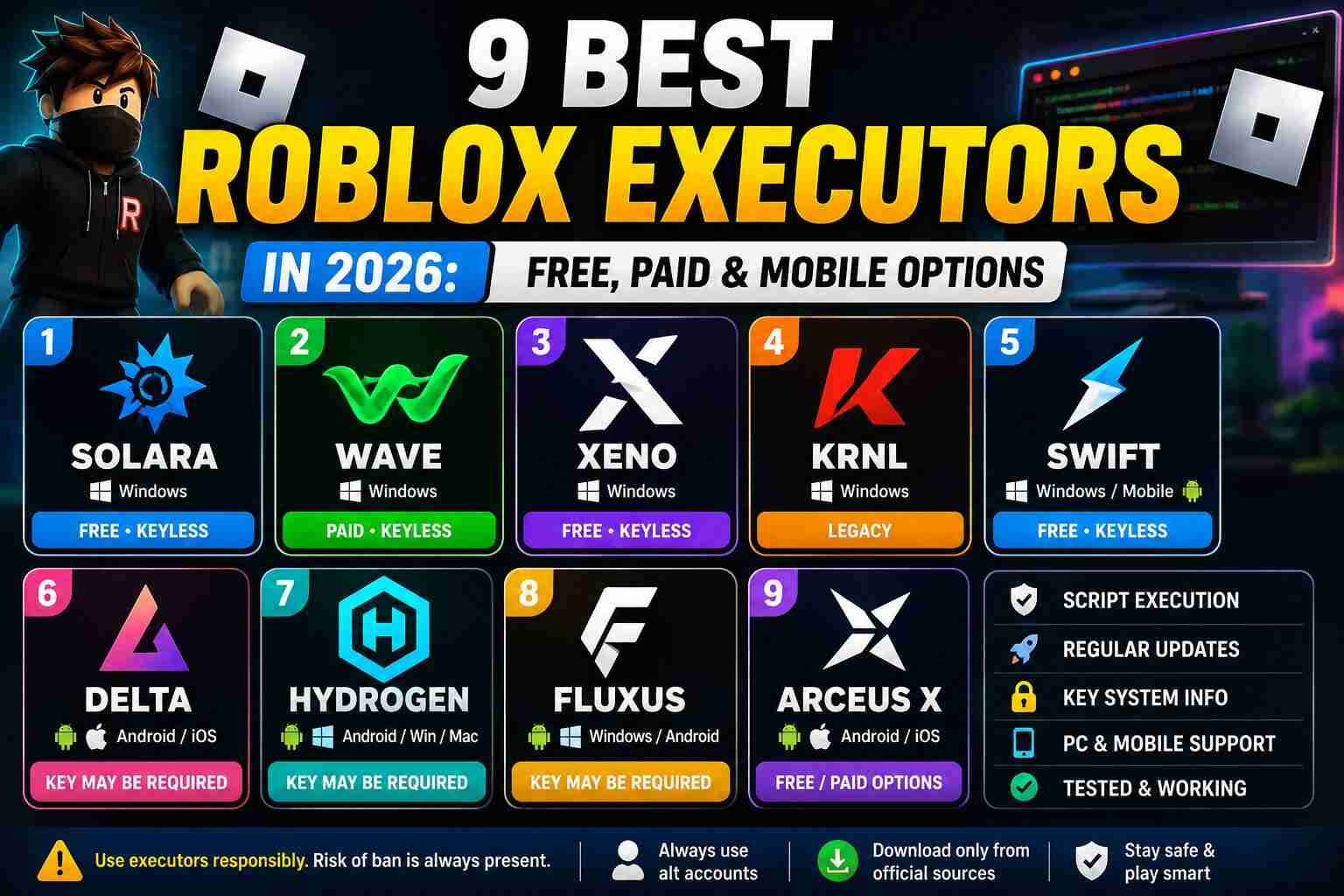
Roblox scripts can add custom features, automation, and other gameplay changes, but running external scripts generally requires a Roblox executor. These third-party tools are designed to load and execute Lua-based scripts outside the normal Roblox Studio environment.
With so many executors available in 2026, choosing the right one can be confusing. Some are designed specifically for Windows, while others focus on Android or mobile devices. Some are free, while others use keys, subscriptions, or paid access.
In this guide, we have covered 9 popular Roblox executors in 2026, along with their platform support, key requirements, notable features, and important safety considerations.
Important: Third-party executors and scripts can violate Roblox's Terms of Use and may result in account restrictions or bans. Downloading executors from unofficial mirrors can also expose your device to malware.
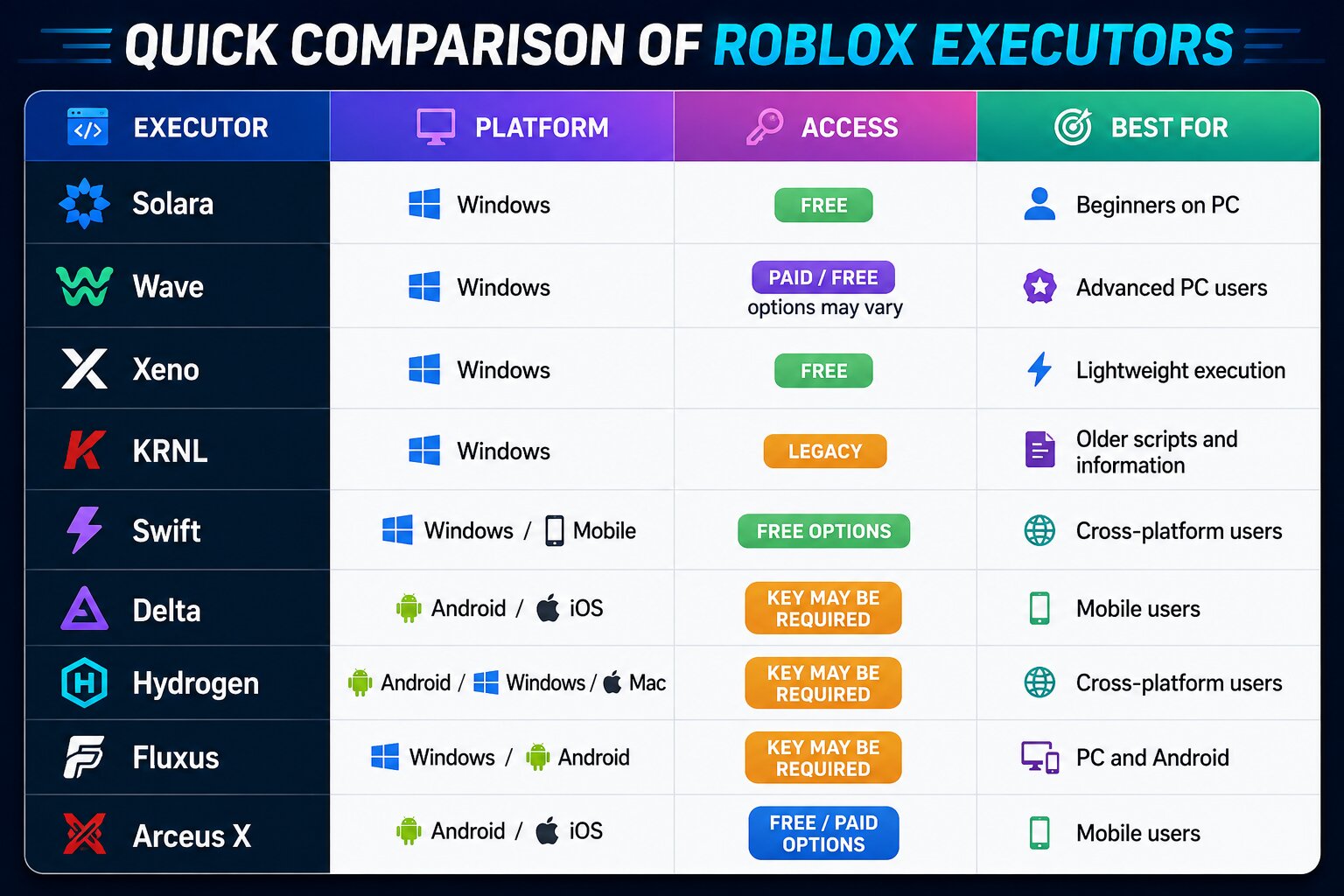
Quick Comparison of Roblox Executors
1. Solara
Platform: Windows
Access: Free
Best for: PC beginners
Solara is one of the better-known names among Windows Roblox executors. Its lightweight design makes it attractive to users who want a relatively simple environment for loading Roblox scripts.
One of its biggest advantages is its straightforward interface. Users don't have to deal with an overly complicated dashboard before loading a script.
Key Features
- Windows support
- Lightweight interface
- Script execution
- Simple user experience
- Popular among PC script users
Solara is worth considering if you're looking for a straightforward Windows option rather than a feature-heavy executor.
2. Wave
Platform: Windows
Access: Availability can vary
Best for: Experienced PC users
Wave has gained attention in the Roblox scripting community because of its focus on execution performance and regular development.
It is generally aimed at users who already understand how Roblox scripts and executors work and want a more advanced environment.
Key Features
- Windows support
- Script execution
- Regular development
- Advanced user features
- Designed for demanding scripts
Wave can be an option for experienced users, although its availability, pricing, and compatibility should always be checked before downloading.
3. Xeno
Platform: Windows
Access: Free
Best for: Lightweight scripting
Xeno is another Windows-based executor that has attracted attention because of its lightweight approach. It is particularly interesting for users who prefer open-source projects and want greater visibility into how a tool is developed.
Key Features
- Free access
- Windows support
- Lightweight design
- Script execution
- Open-source development
If transparency and a relatively simple interface are important to you, Xeno is one of the options worth researching.
4. KRNL
Platform: Windows
Status: Legacy
KRNL was once one of the most recognized names in Roblox scripting. It became popular because of its compatibility with a large number of scripts and its extensive community.
However, users should be careful when searching for KRNL today. Many websites advertise old executors using the KRNL name, and unofficial downloads can be risky.
Key Features Historically Included
- Windows support
- Large script compatibility
- Simple interface
- Large community
- Extensive documentation
Because its current status differs from its historical reputation, don't assume that every website offering “latest KRNL” is legitimate.
5. Swift
Platform: Windows / Mobile availability varies
Access: Depends on build
Swift is another executor frequently discussed by Roblox scripting users. Its main appeal is its focus on providing a relatively simple way to load scripts.
Depending on the current version, platform availability can change, so users should verify the supported device before installing anything.
Key Features
- Simple interface
- Script execution
- PC-focused builds
- Mobile availability may vary
- Easy script-loading workflow
6. Delta
Platform: Android and other supported platforms depending on version
Access: Key requirements may vary
Best for: Mobile users
Delta is particularly popular among Roblox users who want to run scripts on mobile devices.
Its mobile-focused design makes it different from Windows-only executors. Depending on the current release, users may encounter a key system before accessing the executor.
Key Features
- Mobile-focused experience
- Android support
- Script execution
- Built-in interface
- Regularly updated versions may be available
If you're primarily playing Roblox on a phone or tablet, Delta is one of the names commonly considered by mobile script users.
7. Hydrogen
Platform: Mobile / Mac / Windows availability varies
Access: May require a key
Hydrogen is another cross-platform name in the Roblox executor community. Its appeal comes from supporting users who don't necessarily play Roblox exclusively on Windows.
The availability of specific builds can change after Roblox updates, so always verify compatibility before installing.
Key Features
- Cross-platform focus
- Script execution
- Mobile support
- User interface for loading scripts
- Different builds for supported platforms
Get Hydrogen | Read Full Review
8. Fluxus
Platform: Windows / Android
Access: Key requirements may vary
Fluxus has been around the Roblox scripting scene for years and has attracted users on both PC and Android.
Its main purpose is to provide an environment where users can load external Lua scripts and access their available features.
Key Features
- Windows support
- Android support
- Script execution
- User-friendly interface
- Community-supported development
As with other executors, compatibility can change quickly after Roblox updates.
9. Arceus X
Platform: Android / iOS availability varies
Access: Free and paid versions may exist
Arceus X is primarily associated with mobile Roblox scripting. Instead of relying entirely on a traditional desktop-style interface, mobile versions can provide an in-game menu for accessing available features.
Key Features
- Mobile-focused design
- Android support
- iOS availability may vary
- Built-in feature menus
- Script and modification support
Users should be particularly careful with mobile downloads because fake APKs and modified installers are common across unofficial websites.
Get Arceus X | Read Full Review
How to Choose the Best Roblox Executor
There isn't one executor that is perfect for everyone. The right choice depends on your device, experience, and the type of scripts you want to run.
Windows Users
If you're using a PC, you can consider Solara, Wave, Xeno, Swift, or Fluxus, depending on current compatibility.
Android Users
Mobile players commonly look toward options such as Delta, Hydrogen, Fluxus, and Arceus X.
Beginners
A simple interface is usually more important than having hundreds of advanced settings. Beginners should prioritize tools that have clear documentation and an active development history.
Advanced Users
Experienced users may prefer executors with broader script compatibility, better debugging options, and more frequent updates.
What Should You Check Before Downloading?
Before installing any Roblox executor, don't simply download the first file appearing in Google search results.
Check these things first:
1. Platform compatibility: Make sure the executor actually supports your operating system.
2. Recent updates: Roblox updates can break third-party tools, so an old build may no longer function.
3. Source reputation: Avoid random download pages, shortened URLs, and suspicious mirrors.
4. File security: Scan downloaded files with a reputable security tool before opening them.
5. Community activity: An active development community can make it easier to identify fake or outdated versions.
Are Roblox Executors Safe?
There is no universal guarantee that a Roblox executor is safe. The biggest risk often comes from fake executors, unofficial mirrors, modified APKs, and malicious downloads.
A file being advertised as “keyless,” “undetected,” or “100% safe” does not prove that it is actually safe.
Keep these precautions in mind:
- Download only from a source you trust.
- Scan executable files before running them.
- Don't enter your Roblox password into an executor.
- Never give an unknown tool access to unrelated accounts or sensitive data.
- Be cautious with executors that ask you to disable security software.
- Consider using an alternate Roblox account because script usage can result in account penalties.
Can Roblox Executors Get You Banned?
Yes. Using third-party executors or exploiting Roblox games can put your account at risk.
Even if an executor claims to be “undetected” or has an “anti-ban” feature, there is no reliable guarantee that your account will remain safe. Roblox can change its detection systems, and an executor that works today may stop working after a future update.
For that reason, users should understand the risks before using external scripts.
Free vs Paid Roblox Executors
Both free and paid executors have advantages and disadvantages.
Free Executors
Advantages:
- No upfront cost
- Easy to test
- Large number of options
- Suitable for casual users
Disadvantages:
- May have advertisements or key systems
- Updates can be inconsistent
- Some downloads may be fake
- Compatibility can change frequently
Paid Executors
Advantages:
- May offer additional features
- Can provide dedicated support
- Some projects prioritize faster updates
Disadvantages:
- Costs money
- Paid does not automatically mean safe
- Some products may disappear or stop development
- Users still face Roblox account risks
The most expensive executor isn't necessarily the best one. Compatibility, reputation, update frequency, and download safety matter more than price alone.
Frequently Asked Questions
What is a Roblox executor?
A Roblox executor is a third-party program designed to load and execute external Lua scripts while Roblox is running. These scripts can modify or automate certain aspects of gameplay.
Which is the best Roblox executor in 2026?
There isn't one universal best executor. Solara and Xeno are options commonly considered by Windows users, while Delta and Arceus X are associated with mobile Roblox scripting. The best choice depends on your device and current compatibility.
Are Roblox executors free?
Many executors offer free versions, while others may use keys, paid access, or premium tiers. Requirements can change between releases.
Which Roblox executor is best for mobile?
Delta, Hydrogen, Fluxus, and Arceus X are among the names commonly associated with mobile Roblox scripting. Always verify the current supported platform before downloading.
Do Roblox executors work after every Roblox update?
Not necessarily. Roblox updates can break third-party executors, meaning developers may need to release a new version. This is why an executor that worked previously may suddenly stop functioning.
Can an executor get my Roblox account banned?
Yes. Using third-party exploits can violate Roblox's rules and may result in warnings, suspensions, or bans.
Are keyless Roblox executors safer?
No. Keyless does not mean safe. A key system is mainly an access mechanism and doesn't determine whether a downloaded executable is trustworthy.
Why does my Roblox executor stop working?
The most common reason is a Roblox update that changed something required by the executor. Other possibilities include an outdated build, incompatible Roblox version, or a script that is no longer supported.
Should I use an executor on my main Roblox account?
It's risky. Since third-party scripting can result in account penalties, users should understand that their main account could be affected.
Final Verdict
Roblox executors continue to attract players who want to experiment with scripts, automation, and additional gameplay features. Solara, Wave, Xeno, Swift, Delta, Hydrogen, Fluxus, Arceus X, and the legacy KRNL are among the names users may encounter in 2026.
However, choosing an executor isn't only about execution performance or whether it is free. Current compatibility, development activity, platform support, download authenticity, and account safety should all be considered.
Most importantly, remember that third-party executors carry genuine security and Roblox account risks. Avoid suspicious downloads, don't trust “undetected” guarantees, and verify the source before installing anything.
Comments (0)