
Multiple Roblox Instances is a simple way to run multiple Roblox game sessions simultaneously on the same Windows PC. Normally, Roblox is designed around running a single active game client, which can be inconvenient if you manage alternate accounts, test multiplayer features, or want to play more than one game at the same time.
With a multiple game instance setup, you can launch separate Roblox sessions and keep them running independently. Each session can use a different Roblox account, allowing you to create a practical multi Roblox environment from one computer.
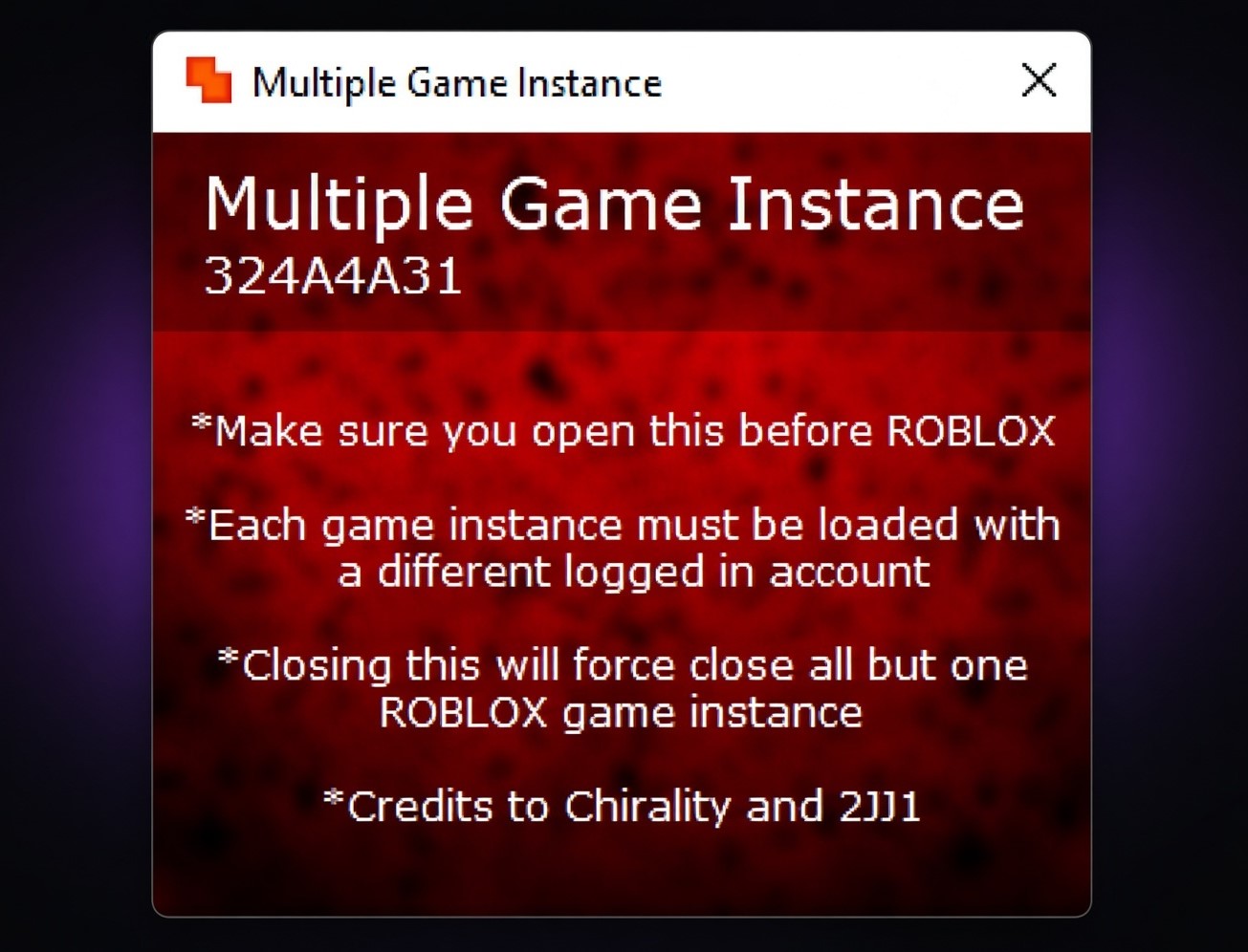
Whether you call it multiple Roblox, Roblox multiple, multi Roblox, or multiple games, the idea is the same: remove the usual one-instance restriction and give you the flexibility to run several Roblox sessions side by side.
What Is Multiple Roblox?
Multiple Roblox refers to running two or more independent Roblox clients on the same computer.
For example, you could launch Roblox using one account, keep that game open, then sign into another account and launch a second session. Both games can remain active at the same time.
This is especially useful for players who maintain multiple accounts, developers testing multiplayer experiences, and users who need several Roblox sessions open without constantly logging out and switching accounts.
The number of sessions you can run isn't necessarily fixed. Your computer's available RAM, CPU, GPU, and network resources ultimately determine how many Roblox clients you can keep running comfortably.
Multiple Game Instance – How Does It Work?
A multiple game instance tool allows separate Roblox sessions to coexist instead of treating the second launch as a request to use the already-running client.
Once the tool is running, you can start your first Roblox game normally. After that, you can return to the Roblox website, switch to another account, and launch another game.
The new session runs separately from the first one.
You can repeat the process for additional accounts and create a multi Roblox setup that includes several active game windows.
Why Use Multiple Roblox Instances?
1. Play Multiple Games at Once
The biggest advantage is being able to keep multiple games open simultaneously.
You can have one Roblox experience running while another session is open in a completely different game. This is useful for players who want to multitask without repeatedly closing and reopening Roblox.
2. Manage Multiple Accounts
If you have several Roblox accounts, logging in and out every time you want to switch between them becomes frustrating.
With Roblox multiple instances, each window can remain signed into its own account, making account management considerably easier.
3. Join the Same Game With Different Accounts
You can also use multiple sessions to join the same Roblox experience with different accounts, provided the game allows the activity.
For example, one account can act as your primary player while another account joins the same server for testing, trading, or other permitted activities.
4. Create a Multi Roblox Testing Environment
Developers can benefit from multi Roblox setups because they can simulate multiple players without requiring several physical computers.
You can test player interactions, multiplayer mechanics, UI changes, trading systems, and other features using separate Roblox clients.
5. Run More Than One Session on One PC
Instead of needing one computer for each account, multiple Roblox instances allow several sessions to share the same machine.
The actual number depends on your hardware. A powerful PC can handle significantly more Roblox clients than a low-end system.
Main Features
- Run multiple Roblox instances simultaneously
- Launch multiple Roblox games on one computer
- Keep different Roblox accounts logged in
- Join the same Roblox game with multiple accounts
- Create a multi Roblox testing environment
- Manage alternate accounts more conveniently
- No fixed artificial session limit
- Number of sessions depends on PC resources
- Lightweight setup
- Simple installation and configuration
- Useful for Roblox developers and testers
- Compatible with Roblox games launched through the supported web version
How to Use Multiple Roblox Instances
Using a multiple game instance setup doesn't need to be complicated.
Step 1: Start the Multiple Roblox Software
Open your multiple-instance software before launching your Roblox games.
This allows the tool to prepare your computer for additional Roblox sessions.
Step 2: Launch Your First Roblox Game
Open the Roblox website, sign into your first account, and join the game you want to play.
Wait until the experience has completely loaded.
Step 3: Keep the First Game Open
Do not close your first Roblox client.
Leave it running while you return to the Roblox website.
Step 4: Log Into Another Roblox Account
Log out of the Roblox website without closing your active game.
Now sign in with another Roblox account.
The second account should not already be connected to another active Roblox session.
Step 5: Launch Another Game
Open a Roblox experience from the website.
Instead of replacing your first session, a new Roblox client should open.
You now have Roblox multiple instances running simultaneously.
Step 6: Repeat the Process
Want another session?
Simply repeat the account-switching and game-launch process.
You can continue creating multiple Roblox instances until your computer reaches its practical performance limit.
How Many Roblox Games Can You Run?
There is no single number that applies to every computer.
A PC with 8 GB of RAM may struggle after only a few Roblox clients, while a system with 32 GB or 64 GB RAM and a powerful processor can handle considerably more.
The experience you're playing also makes a difference. A simple simulator may consume fewer resources than a graphics-heavy Roblox experience.
So while some multiple games tools don't impose a strict software limit, your hardware always has the final say.
Your main limitations are:
- RAM
- CPU usage
- GPU usage
- Available storage
- Network bandwidth
- Graphics settings
- Complexity of the Roblox experience
If your computer becomes slow or Roblox starts freezing, reduce the number of active multi Roblox sessions.
Multiple Roblox for Alternate Accounts
One of the most popular reasons to use multiple Roblox is alternate-account management.
Instead of repeatedly logging out of one account and signing into another, every Roblox window can remain connected to its own account.
For example:
Roblox Instance 1: Main account
Roblox Instance 2: Trading account
Roblox Instance 3: Testing account
Roblox Instance 4: Alternate account
This makes it much easier to work with several accounts simultaneously.
Keep in mind that individual Roblox experiences may have their own rules regarding alternate accounts, rewards, trading, or automated activity.
Multiple Game Instance for Developers
A multiple game instance setup isn't only useful for regular players.
Roblox developers can use several clients to test their experiences from different player perspectives.
This can help with:
- Multiplayer testing
- Player-to-player interactions
- Trading systems
- UI testing
- Server behavior
- Teleport systems
- Private-server testing
- Reproducing multiplayer bugs
- Testing different account permissions
Instead of asking several testers to join every time you make a small change, multiple Roblox sessions can provide a convenient local testing environment.
Does Multiple Roblox Work With Every Game?
The ability to launch multiple Roblox instances is generally independent of the individual experience, but specific games can impose their own restrictions.
A multi-instance tool can allow several Roblox clients to run, but it cannot guarantee that every game will permit multiple accounts, simultaneous rewards, trading, or other multi-account behavior.
If a particular experience prevents certain multi-account activities, you should follow that game's rules.
Does It Work With the Microsoft Store Version?
Compatibility depends on the specific multiple-instance software.
Many multiple Roblox solutions are designed around the Roblox version launched through the Roblox website. Because the Microsoft Store version can use a different installation and launch process, some tools may not support it.
If your multi-instance software specifically states that it supports the web version, use the browser-based Roblox launcher rather than assuming the Microsoft Store client will work.
Is Multiple Roblox Safe?
The concept of running multiple Roblox clients is different from using an exploit or cheat. However, you should still be careful about the software you install.
Only download a multiple game instance application from a trustworthy source and avoid modified executables from random websites or suspicious Discord links.
Do not disable Windows security protections simply because a download tells you to. If a program triggers a security warning, investigate the file and its source before deciding what to do.
Also remember that Roblox and individual experiences can have rules concerning multiple accounts or certain forms of automation.
Is Multiple Roblox Really Unlimited?
Technically, the software may not impose a fixed number of sessions, but your PC does.
You might be able to run five, ten, twenty, or even more Roblox clients on powerful hardware, but every additional instance consumes more resources.
Calling it “unlimited” therefore means there isn't necessarily an artificial software cap. It does not mean your computer can run an infinite number of games.
Multiple Games vs Multiple Roblox Instances
These terms can be confusing because people often use them interchangeably.
Multiple Games generally describes the ability to keep several games open simultaneously.
Multiple Roblox Instances specifically refers to running several independent Roblox clients.
Multiple Game Instance is commonly used to describe the software or technique that makes those separate sessions possible.
Multi Roblox is simply a shorter community term for the same type of setup.
All of them revolve around the same basic concept: running multiple Roblox sessions on one computer.
Frequently Asked Questions
What is Multiple Roblox?
Multiple Roblox means running several independent Roblox game sessions simultaneously on one computer.
What is a multiple game instance?
A multiple game instance is a separate Roblox client running independently from another Roblox client on the same PC.
Can I run multiple Roblox games at the same time?
Yes. With a compatible multi-instance setup, you can keep multiple Roblox games running simultaneously.
Can I use multiple Roblox accounts?
Yes. Separate instances can be used with separate Roblox accounts, making it easier to manage alts.
Can I join the same Roblox game with multiple accounts?
Yes, if the specific Roblox experience allows it.
How many Roblox instances can I run?
There is usually no universal number. Your computer's RAM, CPU, GPU, and the games you're running determine the practical limit.
Is Multiple Roblox free?
Some multiple-instance tools are completely free, while others may offer additional features. Check the software's current licensing information before downloading.
Does multi Roblox work on Windows?
Most popular Roblox multi-instance solutions are designed primarily for Windows.
Does it work on Mac?
That depends on the particular software. Many Windows-focused multiple-instance tools do not provide native macOS support.
Can developers use multiple game instances?
Yes. Developers can use multiple Roblox sessions to test multiplayer features, account interactions, and server behavior.
Will multiple Roblox slow down my computer?
Running many Roblox clients simultaneously can consume significant RAM and CPU resources. Performance depends heavily on your PC specifications.
Can I run the same Roblox account twice?
Using the same account in multiple simultaneous sessions may cause login conflicts or disconnect one of the sessions. Separate accounts are generally more practical.
Do I need to configure every Roblox instance?
The exact setup depends on the software, but a properly configured multiple game instance tool should require minimal configuration.
Does it support automatic updates?
Some tools include a bootstrapper or automatic update system, while others require manual updates. Check the software's current release information.
Do I have to reopen the tool every time?
Usually, you should start the multi-instance software before launching your Roblox sessions, depending on how the particular application works.
Can I use Multiple Roblox for other games?
Some multi-instance applications may support other browser-based or launcher-based games, but compatibility varies. Roblox is the primary use case for most of these tools.
Where are the Roblox instances installed?
The location depends on your Roblox installation and the multi-instance software. The tool generally does not require every game session to have a separate installation.
Final Verdict
Multiple Roblox Instances are a practical solution for anyone who needs more than one Roblox session on a single PC. Whether you're managing alternate accounts, testing a multiplayer experience, or simply want to keep multiple games running simultaneously, a reliable multiple game instance setup can remove the normal one-client limitation.
The key thing to remember is that multiple Roblox is not truly unlimited in terms of hardware. Your PC determines how many sessions you can realistically keep open.
For casual users, a few instances may be enough. For developers and advanced multi-account users, a more powerful PC can provide room for many more multi Roblox sessions.
If you're specifically searching for multiple roblox, roblox multiple, multiple game instance, multi roblox, or multiple games, the underlying solution is the same: run independent Roblox clients instead of being restricted to a single active game.
Comments (0)