
You click a link to get a Roblox script, executor key, download, or another file, and instead of reaching the destination, you land on Linkvertise.
Now there is a timer. Then an advertisement. Maybe a verification step. Sometimes there are several checkpoints before you finally reach the link you actually wanted.
If you regularly download Roblox scripts or refresh executor keys, repeating that process can become frustrating very quickly.
The good news is that there are several ways to handle Linkvertise links. The simplest option is a Linkvertise bypasser: copy the original Linkvertise URL, paste it into a compatible bypass service, and let the service attempt to resolve the destination for you.
This guide explains how to bypass Linkvertise, what a Linkvertise bypass actually does, how bypassvip / Bypass VIP fits into the process, when to use a linkbypass service, and what to try when one method stops working.
Quick answer: For occasional use, a web-based Linkvertise bypasser is the easiest option. Copy the Linkvertise URL, open a compatible bypass service, paste the URL, and start the bypass process. If one service reports that the link is unsupported, try another rather than repeatedly refreshing the same page.
What Is Linkvertise?
Linkvertise is a link monetization platform that places an intermediate page between you and the destination URL.
Instead of immediately opening the final page, you may be asked to complete one or more actions. Depending on the link, this can include advertisements, countdowns, verification steps, or other requirements.
The idea is straightforward: the person sharing the link can monetize traffic before the visitor reaches the original destination.
For someone downloading free content, however, the extra steps can become annoying.
This is especially noticeable with Roblox content. A player may need to visit a script page, follow an executor key link, pass through Linkvertise, and repeat the process whenever the key expires.
That is where the search for a Linkvertise bypass or Linkvertise bypasser usually begins.
How to Bypass Linkvertise
The easiest approach is using a web-based bypass service.
You generally don't need to install software for this method.
Step 1: Copy the Linkvertise URL
Go back to the page where you originally found the link and copy the Linkvertise URL.
If possible, copy the original Linkvertise URL rather than spending time going through every checkpoint first.
Step 2: Open a Linkvertise Bypasser
Open a Linkvertise-compatible bypass service in another browser tab.
A commonly searched option is BypassVIP, also written as Bypass VIP.
Step 3: Paste the Link
Paste your Linkvertise URL into the bypasser's input field.
Step 4: Start the Bypass
Click the button provided by the service to begin processing the URL.
The service will attempt to resolve the Linkvertise redirect and return the destination when it can.
Step 5: Open the Result
If the bypass succeeds, use the returned destination link instead of continuing through the original Linkvertise page.
That's the basic how to bypass Linkvertise process.
Linkvertise Bypass vs Linkvertise Bypasser
These terms are closely related, but people usually search them with slightly different intentions.
Linkvertise Bypass
A Linkvertise bypass generally means the overall process of getting around the intermediate Linkvertise page and reaching the destination.
It can refer to a website, browser method, userscript, extension, or another technique.
Linkvertise Bypasser
A Linkvertise bypasser usually refers to the actual tool or service that processes the Linkvertise URL for you.
For example, instead of manually interacting with the Linkvertise page, you give the URL to a bypasser and it attempts to resolve the destination.
So, in simple terms:
Linkvertise bypass = the process
Linkvertise bypasser = the tool used for that process
BypassVIP and Bypass VIP
BypassVIP, sometimes searched as Bypass VIP, is one of the names users may encounter when looking for a Linkvertise bypass service.
The important thing to remember is that bypass services can change over time.
A service that works today may stop supporting a particular Linkvertise URL after Linkvertise changes its redirect or verification system. Because of that, you shouldn't assume that any single bypasser will permanently work with every Linkvertise link.
If bypassvip doesn't process your URL, don't keep submitting the same link repeatedly. Try another compatible method instead.
What Is a Linkbypass Service?
The term linkbypass is broader than Linkvertise itself.
A linkbypass service may support several different monetized-link or short-link platforms rather than focusing exclusively on Linkvertise.
This can be useful if you frequently encounter different types of intermediate download pages.
For example, you may encounter one Linkvertise URL today and a different advertising redirect tomorrow. Having an alternative bypass method can save time when one particular service doesn't recognize the URL.
Why Does a Linkvertise Bypass Sometimes Fail?
No bypass service can guarantee permanent compatibility.
Linkvertise can change how its links, sessions, redirects, or verification steps work. When that happens, a previously working bypasser may suddenly return an error.
The most common reasons include:
The Linkvertise URL Format Changed
The bypasser may not yet recognize a newer URL format.
The Service Has Not Been Updated
Bypass services need to adapt when the target platform changes.
The Link Is Not Actually Supported
Some URLs that look similar to Linkvertise may belong to another service.
The Destination Requires Additional Verification
Some links contain additional checks that a particular bypasser cannot process.
The Bypasser Is Temporarily Down
Even a working service can experience downtime or maintenance.
What to Do When a Linkvertise Bypasser Says "Link Not Supported"
Don't keep clicking the same button over and over.
Try this sequence instead:
- Confirm that you copied the complete Linkvertise URL.
- Make sure there are no spaces before or after the URL.
- Try another Linkvertise bypasser.
- If several services fail, open the original link normally.
- Check whether the destination itself is still available.
- Try again later if the bypass service has not yet caught up with a Linkvertise change.
This is particularly important with newly changed links. A bypasser may need time to update after Linkvertise changes its system.
Can You Bypass Long Linkvertise Timers?
Long waiting periods are one of the main reasons people search for Linkvertise bypass tools.
A bypass service may attempt to resolve the destination without requiring you to sit on the original Linkvertise page for the entire advertised waiting period.
However, this isn't something that can be guaranteed for every link.
If a particular bypasser cannot process the URL, switching to another service is generally more useful than repeatedly refreshing the same page.
Can You Use a Linkvertise Bypass on Mobile?
Yes, a web-based approach is generally the easiest option for mobile users because it doesn't require installing a desktop application.
Android
- Copy the Linkvertise URL.
- Open your mobile browser.
- Visit a compatible bypass service.
- Paste the URL.
- Start the bypass.
- Open the returned destination if successful.
iPhone and iPad
The basic process is similar:
- Copy the Linkvertise URL in Safari.
- Open the bypass service.
- Paste the URL.
- Start processing.
- Follow the returned destination.
Web-based methods are generally more convenient on mobile than desktop extensions or userscripts.
Linkvertise Bypass for Roblox Scripts and Executor Keys
Roblox users frequently encounter Linkvertise while looking for scripts, script hubs, executors, or keys.
For example, you may find a Roblox script that redirects you to a Linkvertise page before revealing the actual destination.
The workflow is usually:
Roblox script page → Linkvertise URL → intermediate page → destination
A bypasser attempts to process the intermediate URL so you don't have to manually complete every step.
However, keep in mind that bypassing Linkvertise and using Roblox scripts are separate issues. A Linkvertise bypass does not make an executor or script safe, legitimate, or compatible with Roblox.
Why Linkvertise Bypass Tools Stop Working
The biggest reason is that these services depend on the way the target platform currently handles redirects and verification.
When that process changes, tools that depended on the previous behavior can stop working.
That's why you may see this pattern:
Works today → Linkvertise changes something → bypass fails → developer updates the tool → bypass works again
This also explains why searching for the latest Linkvertise bypasser can be more useful than relying on an old tutorial that recommends one service indefinitely.
There is no sensible way to promise that one bypasser will remain the best forever.
Are Linkvertise Bypassers Safe?
This is where you should be careful.
Not every website calling itself a Linkvertise bypasser, bypassvip, or linkbypass service should automatically be trusted.
Some sites can use aggressive advertising, misleading download buttons, notification prompts, fake verification pages, or redirects.
Watch for these warning signs
- Fake "Download" buttons
- Requests to install unrelated software
- Unexpected browser extensions
- Requests to enable notifications
- Suspicious executable downloads
- Pages pretending that your device is infected
- Requests for passwords or account credentials
- Multiple forced redirects
A bypass service should not need your Roblox password.
Never enter your Roblox login information into a Linkvertise bypasser.
BypassVIP vs Other Linkvertise Bypass Methods
Instead of assuming one service will always work, think about the different approaches available.
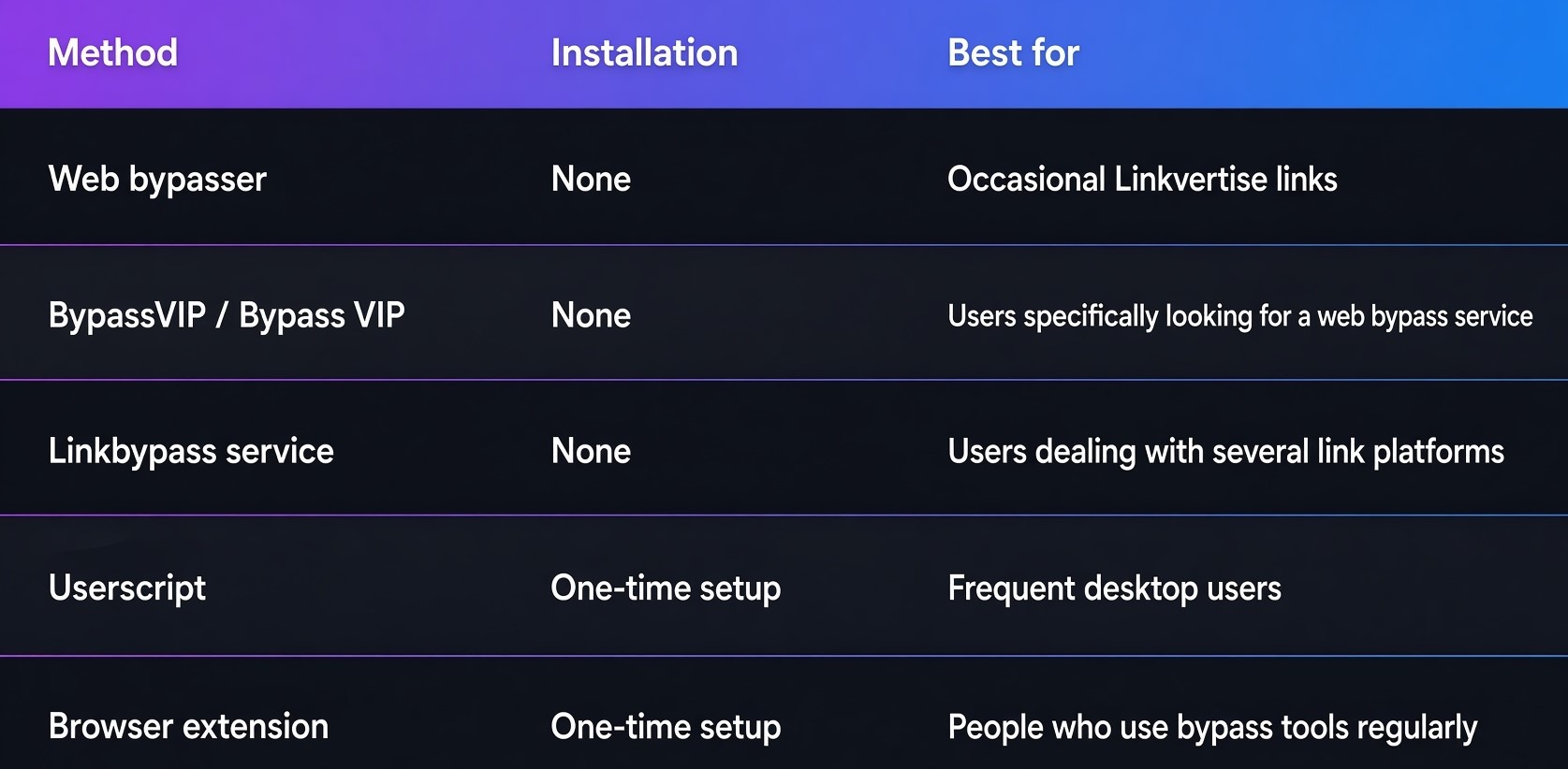
For most people, the web bypasser approach is the simplest starting point.
Can You Permanently Bypass Linkvertise?
There isn't a reliable permanent bypass that can guarantee every future Linkvertise URL will work.
A userscript or browser extension can automate some of the process, but it can also stop working when Linkvertise changes its system.
In other words, "permanent" should be treated carefully.
A better approach is to use a method that is actively maintained and keep an alternative available when the first option fails.
Common Linkvertise Bypass Problems
The bypass page is stuck
Refresh once and try again. If the issue continues, use another service.
The URL is unsupported
The service may not support that Linkvertise format yet. Try another bypasser.
The destination is blank
The original destination may have been removed, changed, or may require additional processing.
The bypasser redirects to advertisements
Leave the page if the redirects become suspicious. Don't install anything simply because the page says it is required.
The bypass worked yesterday but not today
This can happen after changes to Linkvertise or the bypass service. Try an alternative method.
The original Linkvertise page keeps resetting
If you're using the normal Linkvertise page, browser extensions, blocked scripts, cookies, or network issues can interfere with the process. Try a clean browser session before assuming the URL itself is broken.
Frequently Asked Questions
What is a Linkvertise bypass?
A Linkvertise bypass is a method for attempting to reach the destination behind a Linkvertise URL without completing the normal intermediate steps.
What is a Linkvertise bypasser?
A Linkvertise bypasser is a website, tool, userscript, or extension that attempts to process a Linkvertise URL and return its destination.
How to bypass Linkvertise?
Copy the original Linkvertise URL, paste it into a compatible bypass service, start the process, and open the returned destination if the service successfully resolves it.
What is BypassVIP?
BypassVIP, also written as Bypass VIP, is a name associated with web-based bypass services that users may search for when looking for ways to process Linkvertise URLs.
What does linkbypass mean?
Linkbypass is a general term for services designed to get around intermediate advertising or monetized-link pages. Some services may support multiple platforms.
Does every Linkvertise bypasser work with every link?
No. Support can vary depending on the URL format, destination, and current Linkvertise system.
Why did my Linkvertise bypass stop working?
The bypass service or Linkvertise may have changed. Try another compatible service and check whether the destination link is still active.
Can I use a Linkvertise bypass on Android?
Yes. Web-based bypass methods are generally the easiest approach on Android because they don't require desktop software.
Can I use Linkvertise bypass on iPhone?
Web-based methods can also be used from Safari on iPhone or iPad.
Do I need to install software?
Not for a basic web bypasser. You can simply copy and paste the URL into the service.
Should I enter my Roblox password?
No. A Linkvertise bypasser should never require your Roblox account password.
Is every bypassvip or linkbypass website safe?
No. Treat unfamiliar bypass websites cautiously and avoid pages that request unnecessary downloads, account credentials, or suspicious browser permissions.
Final Thoughts
If you regularly encounter Linkvertise while downloading Roblox scripts, getting executor keys, or accessing other free resources, the easiest solution is usually a web-based Linkvertise bypasser.
Start by copying the original URL rather than spending time completing every checkpoint. Try a service such as BypassVIP / Bypass VIP, and if the URL isn't supported, move to another compatible option.
The important thing to understand is that Linkvertise bypass tools are not permanent solutions. When Linkvertise changes its redirect or verification system, individual bypassers can stop working until they're updated. That's why keeping more than one legitimate method available is more practical than relying on a single service forever.
And above all, be careful with fake bypassvip, linkbypass, and other bypass websites. Never provide your Roblox credentials or install unrelated software simply to get through an advertising link.
If you are using Linkvertise-based key systems, the same basic workflow can apply to different Roblox executors and script setups. If you are looking for a compatible executor first, check our Roblox executor guide to compare available options and find one that fits your device and script requirements.
Once your executor is ready, our How to Use Roblox Scripts guide covers the complete process, including opening an executor, loading a script, executing it, and troubleshooting common issues.
If you use multiple Roblox accounts, you may also want to check our Multiple Roblox guide for information on running multiple Roblox game instances and managing separate sessions on the same computer.
Looking for a simpler option? You can also browse +1 Roblox Scripts if you want scripts that do not require a key system. The site also has a Latest Scripts section where you can find currently popular scripts.
Comments (0)